



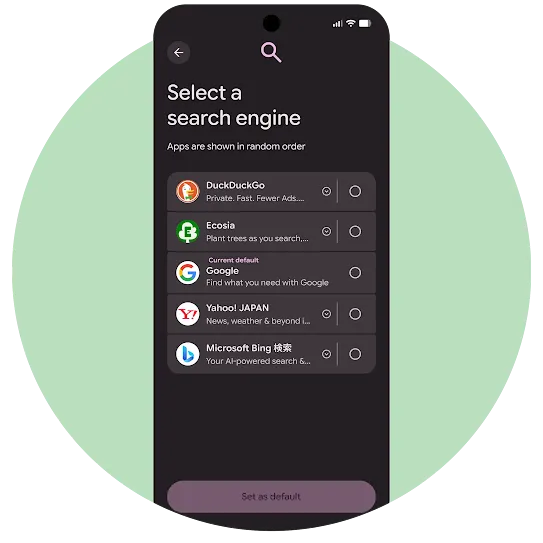
Search Choice Screen
Eligibility criteria for participating in the search choice screen
To ensure an optimal user experience, search providers that wish to participate in the choice screen on Android and Chrome must satisfy the following requirements:
- General search provider:
The search provider must operate a "general search service." For purposes of the choice screen, a general search service is one that allows users to search for information across the entire Internet. Specialized or "vertical" search providers -- those that only index content from a particular subject -- are not eligible to participate in the choice screen. - One app per company:
Only one of all the general search service providers that are owned by or affiliated with the same company are eligible to appear on the choice screen. - One choice screen per app:
To prevent user confusion, an application may be featured on either the browser or the search choice screen, but not on both. - Localization:
Search providers must provide Japanese language support. Local language support in this context means that the user interface of both the search app (e.g. settings menu) and the search results page (e.g., navigation buttons) must be provided in one of the required local languages. - App in Google Play:
The general search provider must have an app that is available free of charge in Google Play to users in Japan. The provider must be in compliance with the terms of the Google Play Developer Distribution Agreement. - Branding requirements:
The general search provider must operate a general search service as a distinct service and brand, not as a sub-feature and/or sub-brand of another product. - Web search experience:
The provider’s web search experience must be compatible with the requirements to become a default search provider in Google Chrome and operate over HTTPS. - Functionality required:
The general search app must provide your full “general search service” without requiring or prompting the user to move or upgrade to another app or website. - Android OS support:
The general search app must support the latest version of Android within 90 days of release. - Minimum installs:
The search app must have a minimum of 5,000 user installs.
Choice screen display and ordering
Android Search Choice Screen
The top five ranked eligible general search services according to Google Play installation data will be displayed, ordered randomly for each user.
Chrome Search Choice Screen on iOS
The Chrome search choice screen will show for new and existing Chrome users on iOS.
For more information, please visit chrome.com/choicescreen/msca
How to apply
To request an application, submit this interest form.
FAQs
Does it cost anything to appear in the choice screen?
No. Participation by eligible general search services is free.
Can search providers still do pre-installation deals with OEMs?
Yes. Participation in the choice screen does not affect your ability to enter into pre-installation deals with OEMs.
Where will the selected search provider’s app icon be placed upon installation?
The selected search provider’s icon will be placed according to the OEM’s device launcher logic, as if the user had downloaded the app from Google Play themselves.
Can OEMs prevent the display of the choice screen or override a user’s choice screen selection?
Choice screens are mandated under Japan’s Mobile Software Competition Act, enforced by the Japan Fair Trade Commission (JFTC). To meet this obligation, Google has incorporated a provision within its contracts with OEMs to prevent circumvention of the choice screen. OEMs have the discretion to make the home screen search box removable, should they choose to do so.
What happens if the user deletes the search app that they installed via the choice screen?
Once a user makes their selection in the choice screen, the selected search provider’s app is installed on the device. If a user deletes the app of their selected search provider, that home screen search box will also be deleted. However, the Chrome default search engine will remain unchanged.
What happens if the user does not have network connectivity during device setup?
If a user does not have network connectivity, the eligible users will be presented with a persistent notification upon next network connection, reminding the user to complete setup, which includes the Android choice screen selections.
What happens if the user skips the Google account login screen during device setup?
The choice screen is still shown in the case that the user skips an account login.
Does the Android choice screen have any connection with the list of possible search defaults in Chrome?
The list of search engines used for the Android choice screen will be the same list used for Chrome's search provider list.
If the OEM has a default browser set, and the user selects a search provider from the choice screen, does this have any impact on the default browser settings?
The Android search choice screen does not impact any browser other than Chrome.
Does the choice screen appear on devices where search rivals have done a pre-installation deal with a rival?
The choice screen will appear on all eligible devices, irrespective of whether rival search providers are pre-installed.
Can a user change the search provider after it is selected?
Users are able to easily customize their search services following the completion of the choice screen, for example by changing Chrome’s search default, or moving, removing or replacing the home screen search box. The text that appears on the choice screen makes clear that users can take these steps.
When will a user see the choice screen?
The choice screen will either be (i) part of the initial setup for new Android devices or (ii) included in a persistent notification for users who do not complete setup or have an existing device.
Will a user see the choice screen more than once?
A user will see the choice screen once. For existing devices, users will see the choice screen through a persistent notification. Otherwise, users will see the choice screen when they go through device setup.
Does Google feed into Google Search the data it might be able to gather from rival search providers’ default status on Chrome or the search box?
Google does not collect search queries that are entered into the search box. In regards to Chrome, Google does not receive information about queries sent to rival search engines unless the user enables Chrome features that store their browsing history with their Google Account. Any data recorded in relation to the choice screen will be used for maintenance and improvement of the user interface.
Does Google sell any data that it collects from the choice screen?
No.
Can search providers monitor search traffic coming from Chrome as a result of the user’s selection in the choice screen?
Yes. Chrome supports custom URL parameters submitted by search providers during the asset submission period.
Can search providers monitor installations triggered through the choice screen?
Search providers can use the Google Play Store’s Install Referrer API to securely retrieve referral content from Google Play and to identify and differentiate installations triggered through the Play Store and the choice screen during device setup.
How can search providers track search queries coming from the home screen search box?
Search providers can track this by incorporating their own in-app analytics and analyzing sessions based on the specific search intent action provided by Google in the technical requirements document.