




Discover how Find Hub and the Find Hub network make finding lost belongings easy.
From tracker tags to Find Hub: how Android can help you find your misplaced belongings.
The dreaded realization that an important item has been lost or misplaced is a feeling we know all too well. You pat your pockets for your keys as you head for the door, reach for your wallet in a busy checkout line, or watch the luggage carousel spin one last time - and find nothing there. How do you locate these missing items? That’s where Android tracker tags come in. With Find Hub, your Android phone is now part of a private and secure crowdsourced network designed to make it easier to find lost items. Tracker tags from partners like Chipolo, Pebblebee, and Moto are essentially AirTags for Android - built to work perfectly within the ecosystem you already use.
Finding misplaced items at home: the “couch cushion” search.
Let’s start with the everyday scenarios where things just seem to vanish into thin air. Have you ever had trouble finding your keys? It happens to all of us. You’ve checked the kitchen counter and your coat pockets. You know they’re somewhere in the house, but you just can’t seem to find them. And the last-minute search is turning into a full-blown panic. Here’s how Android tracker tags can help.
The solution: pinpoint with sound and sight.
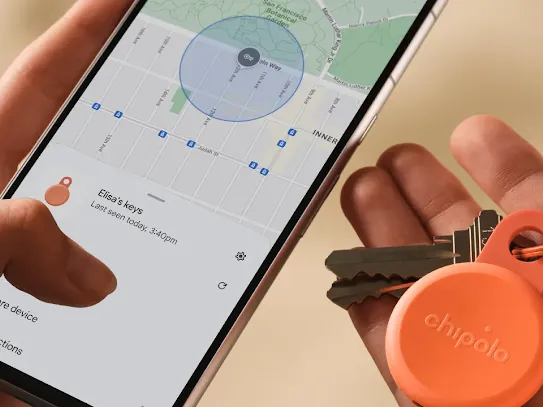
With a compatible tracker tag attached to your keys, you can open the Find Hub app on your phone and find them in seconds.
- Make it ring: Tap a button in the app to make your tracker tag play a loud ringing sound. Just follow the sound to find your keys. They’ll inevitably be hiding under a stack of mail or couch cushion.
- Find nearby: For a quieter search, the app provides a visual “hot-and-cold” guide. As you walk around, your phone screen will show you either getting closer or farther away, helping to lead you right to your item.
Android tracking tags to consider.
- Moto Tag 1 & 2: Comes equipped with Ultra Wideband (UWB), which allows for more precise nearby finding, as it shows distance and direction. It's a great all-rounder that can also be used as a remote shutter for your phone’s camera.
- Chipolo POP & LOOP: Perfect for keys, thanks to its loud ring and a built-in hole for keyrings.
- Pebblebee Clip 5: This tag has LED illumination, which flashes a light when you ring the tag, making it easier to find lost objects in the dark.
Securing slim valuables: finding your wallet and passport.
Some of our most important belongings, like wallets and passports, need a different kind of tracker – one that’s discreet and doesn’t add any extra bulk. This is how you can find your lost valuables without having to empty your bag or turn your house upside down.
The solution: sleek and seamless tracker tags.
For these items, tracker tags designed in a card-like shape are the perfect fit. They’re thin enough to slide into a wallet’s card slot or a passport holder, giving you peace of mind without adding the extra bulk.
Android tracking tags to consider.
- Pebblebee Card 5: The ultimate choice for wallets and passport holders, designed to be as thin and discreet as a credit card. Similar to other tracker tags, it operates using Bluetooth to connect to Google’s Find Hub, and uses both light and sound to help you detect its whereabouts.
Travel with peace of mind: long-distance finding for luggage, bikes, and more.
What about looking for your valuables when they’re much farther away – like checking to see whether your suitcase made it onto a connecting flight, or confirming that your bike is still locked up where you left it hours ago? This is where the true power of the crowdsourced Find Hub network shines, helping you with the challenge of finding lost items across long distances.
The solution: the global Find Hub network.
Here’s how to find something you lost, even when it’s miles away.
- Crowdsourced power: The FindHub network connects billions of Android devices around the world. When another Android user with Find Hub enabled passes near your lost item, their device securely sends its location to the network. This updates the item’s position on your map.
- Privacy first: Network locations are end-to-end encrypted, and no one can see the location of your item unless you share it. It’s a core part of Android’s commitment to safety.
- Bluetooth vs. GPS, explained: GPS tracker tags are great for real-time locating of moving vehicles, but often require a monthly subscription and have low battery life. Bluetooth-connected Android tracker tags leverage the Find Hub network and have batteries that can last for more than a year. The network’s reach is effectively global, thanks to the sheer number of Android devices in use around the world.
Android tracking tags to consider.
- Any standard Android tracker tag can do the job. Simply place a Chipolo, Pebblebee, or Moto tag inside your luggage, your bike’s tool pouch, or your car’s glovebox for robust and reliable long-distance tracking.
Your safety and control: preventing unwanted tracking.
With this powerful network comes a deep commitment to your safety and privacy. Android has built-in features to give you peace of mind and full control, ensuring that no one can use a tracker tag to monitor you without your knowledge.
The solution: proactive unknown tracker tag alerts.
Android phones have built-in safety features to protect you.
- Automatic alerts: Your phone will automatically notify you if it detects an unknown Bluetooth tracker tag, including Apple AirTags traveling with you over time. This is your primary defense against unwanted tracking.
- Manual scan: You can also take control yourself. If you’re concerned, you can go to your phone’s settings and manually scan for any tracker tags that might be nearby. This gives you the power to find and disable any device you do not recognize.
With the Find Hub network, Android users have a world-class, secure, and easy-to-use system for finding lost items. Add helpful Android tracker tags to the mix, and the daily anxiety of misplacing something valuable can finally be put to rest.