

What’s new on Android.
From mixing and matching outfits in your own digital wardrobe to spotting scammers impersonating your contacts, explore the latest updates to your devices.
Express yourself.
From planning an outfit in your digital wardrobe to searching for an entire look in one go, explore the latest features designed to help you make your mark.
Express yourself.
From planning an outfit in your digital wardrobe to searching for an entire look in one go, explore the latest features designed to help you make your mark.
-
Circle to Search
Circle an outfit to find every piece.
From tops to footwear and everything in-between, Circle to Search finds them all – no need to switch apps.1
-
Gemini
Get help that's tailored to you in Gemini.
Gemini can be uniquely helpful to you when you connect your favourite apps like Gmail, Photos and YouTube.2 -
Gboard
Your emoji got a whole lot cuter 🐭+🩷.
When a simple pink heart isn't enough to capture how you feel, remix your emoji into something more.3
Gemini
Talk, type, do it all in one place.
Switch seamlessly between talking and typing with Gemini Live built into your chat.4
Power up your day-to-day.
From keeping your calls safer to getting real-time translations on your phone, check out the features making everyday moments better.
Power up your day-to-day.
From keeping your calls safer to getting real-time translations on your phone, check out the features making everyday moments better.
Phone by Google
Spot scammers impersonating your contacts.
Get alerts if a scammer appears to call from a number you trust – so you can end the call fast.5
-
Google Play Books
Recaps and insights – right from your page.
Get a recap of what you’ve read so far and ask questions to dive into themes, context or characters.6 -
Google Meet
Live translations – now on Android phones.
Hear real-time translations that capture the speaker’s voice and tone – wherever your phone takes you.7
Stay connected.
Whether you’re sharing photos or setting alerts for when friends arrive home safely, these updates help you stay connected to the people who matter most.
Stay connected.
Whether you’re sharing photos or setting alerts for when friends arrive home safely, these updates help you stay connected to the people who matter most.
Find Hub
Get notified when friends arrive home.
Set alerts for when loved ones leave work, arrive home or reach a planned location – no check-ins needed.8
-
-
Personal Safety app
Get peace of mind with safety features for kids.
Coming soon: Children will be covered by features like car crash detection, as well as medical info and emergency contacts.11
See the new features in action.

Link to Youtube Video (visible only when JS is disabled)
Android 17.
New multitasking, gaming and creator tools make your device better than ever.
Read more
Android 17.
-
Screen reactions
Reactions in real time.
Create screen recordings that capture both your screen and your front-facing camera. React to videos, articles or comments at the same time. Coming first to Pixel devices mid-year. -
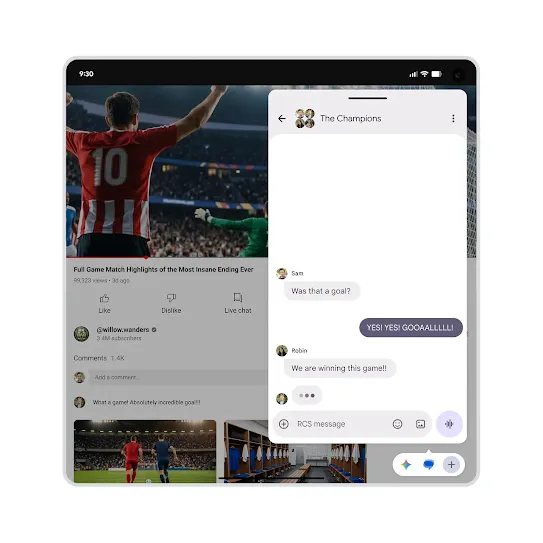 Bubbles
Make multitasking easier.
Bubbles, a notification feature on Android, now goes beyond chats. You can open and switch between more than 2 apps. We’re also introducing a new bubble bar interface for foldable devices.
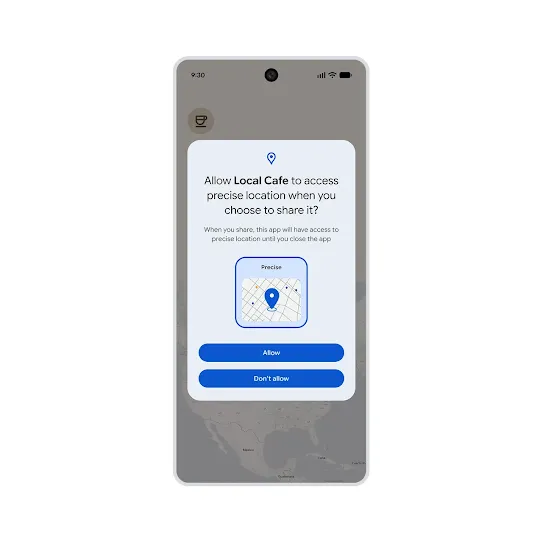
Location button
Precision and peace of mind.
Always get the privacy and security you need when sharing your location. You control what apps use your location and for how long – all with a simple press of a button.
-
 Gaming controls
Make the game yours.
Android lets you remap the controls for your gamepad to customise your gaming experience. And your foldable device can turn into a gaming machine with new dedicated controls. -
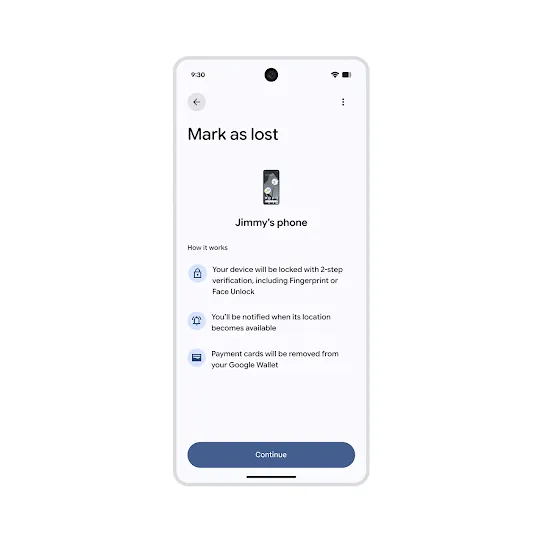 Mark as lost
More enhanced security.
The 'Mark as lost' feature on Find Hub locks your device and can’t be unlocked without your fingerprint or Face Unlock. Your details on Google Wallet are automatically removed, while personal data and settings are disabled.